 Voltsy
iPhone Battery Health: What an App Can and Cannot See
The short answer: iOS keeps your battery's measured condition to itself. Any iPhone app that prints a health percentage is estimating from the same four public readings every other app gets.
Where the real number lives
Apple measures your battery and shows the result in Settings. That is the figure to trust, and it costs nothing.
- Open Settings.
- Tap Battery.
- Tap Battery Health and Charging.
You get maximum capacity as a percentage of new, and on iPhone 15 and later the cycle count, the manufacture date and the date of first use as well.
What iOS hands an app instead
Four readings. That is the entire surface, and it is the same for every app in the App Store, including this one.
- Charge level A fraction from 0 to 1, rounded to about five percent steps.
- Charge state Charging, unplugged, full or unknown.
- Low Power Mode A simple on or off flag.
- Thermal state One of four coarse levels, never a temperature in degrees.
- Maximum capacity Not exposed to apps.
- Cycle count Not exposed to apps.
- Voltage, current, mAh Not exposed to apps.
Why the level itself is fuzzy
Until iOS 16 the charge level came to apps in one percent steps. From iOS 17 it arrives rounded to roughly five percent, and Apple's own developer support has confirmed that the value is an approximation and that the degree of rounding is not part of the contract. There is no workaround. An app can read 80% while your status bar shows 78%, and both are behaving correctly.
That single fact rules out a whole class of claims. An app cannot measure how much charge went into your battery this session with any precision, so it cannot derive a trustworthy capacity from it either.
If you want the deep numbers, use a computer
Plugged into a Mac or a PC, your iPhone exposes diagnostic data that no app on the phone can reach. Tools such as coconutBattery on macOS, iMazing, or 3uTools on Windows read design capacity, current capacity and cycle count over the cable. For checking a used iPhone before you buy or sell it, that is a better tool than anything on the App Store, Voltsy included.
So what is a battery app good for?
Not diagnosis. Habit. The things that measurably shorten a lithium ion battery's life are heat, long stretches held at full, and repeated deep drains, and all three are visible through the four readings above. That is where Voltsy works.
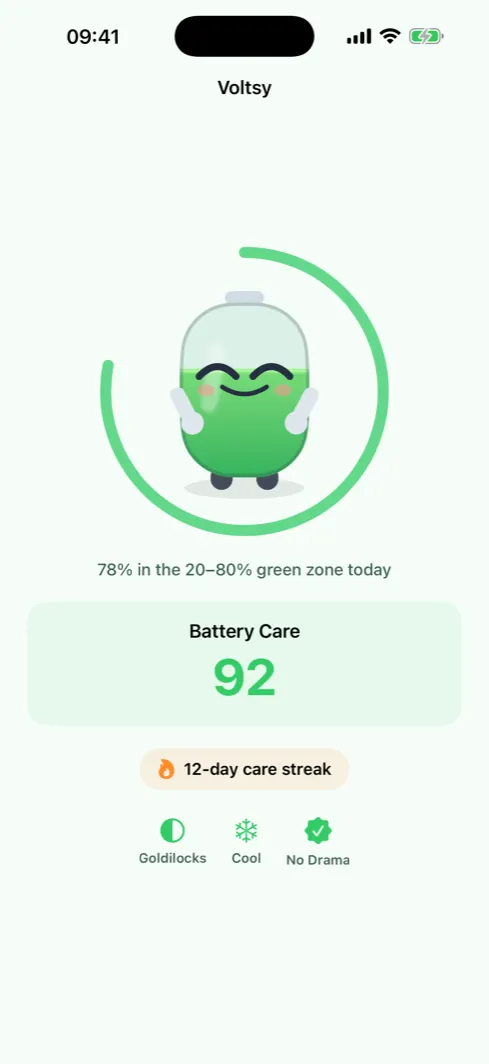
Volt reacts to your charge in eight moods, nudges you once when you charge past the threshold, and keeps a daily streak going. Every figure is labelled as an on device estimate, and the app links you straight to Settings for Apple's measured number.